
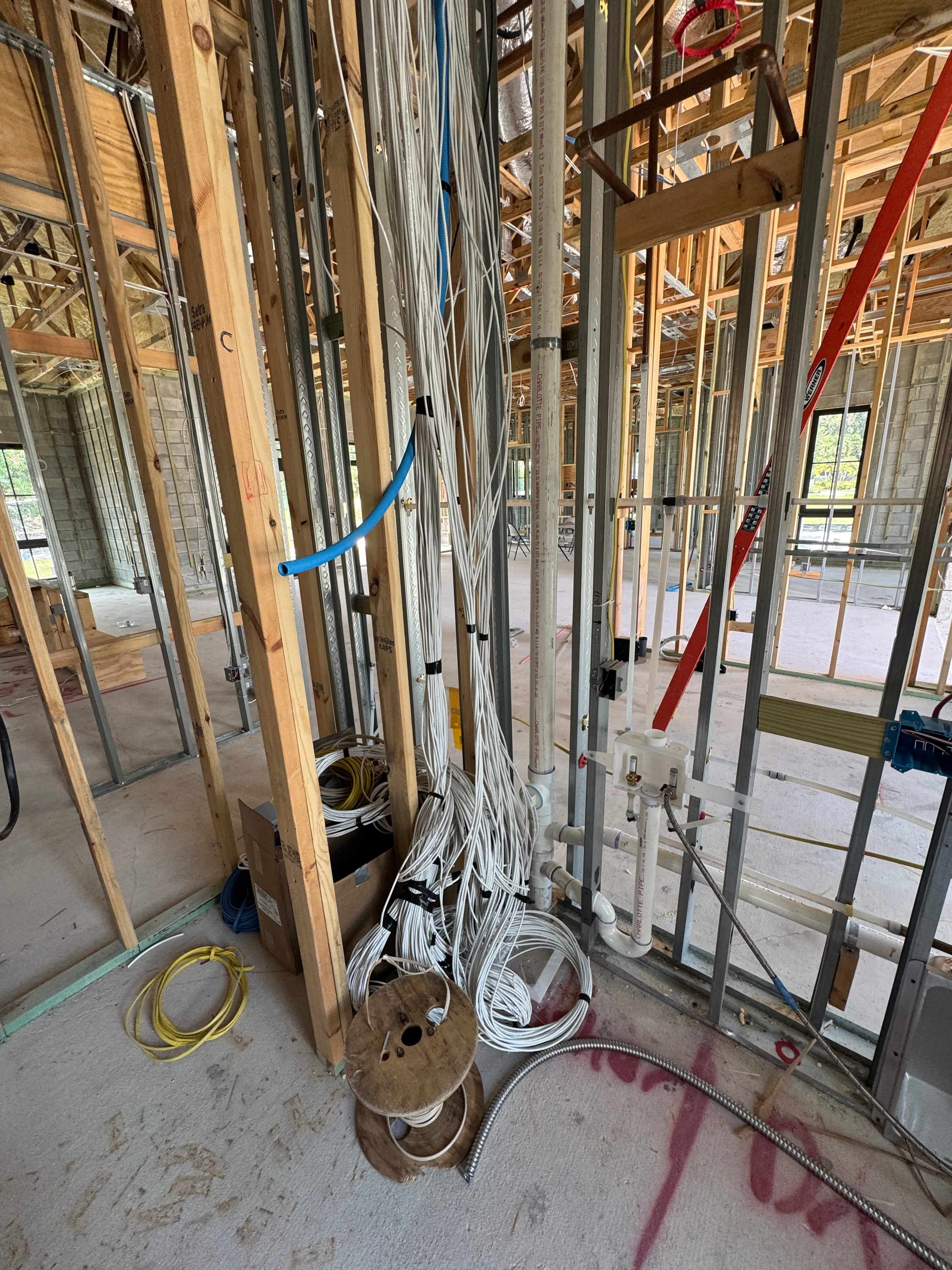
Home security systems have become essential in ensuring that a property is well protected. Various gadgets such as security cameras, alarms, access control systems and other devices can help homeowners monitor what is happening around their property and respond to potential problems.
While the security equipment gets most of the attention, the cabling behind the system is also important. The right low voltage cable can help connect security devices and support reliable communication between them.
Choosing and installing the right cabling may seem complicated if you are not familiar with technology. Understanding a few basics can make it easier to see why professional cabling matters.
A low voltage cable is designed to carry lower levels of electrical power or signals at low voltages from one device to another. It is typically used in technology and communication systems rather than the high-voltage electrical wiring used to power major household appliances.
In a home security system, the cables can be used to link devices such as security cameras, alarms, sensors, access control and other technologies among others.
The exact cable needed depends on the equipment being installed. Different security devices can have different wiring requirements. Therefore, there is no single cable that works for every system.
Low-voltage cabling can support several parts of a home security setup.
Modern security cameras often use network connections to send video and other information to a recording system or network.
Some IP cameras can also receive power through the same network cable when they support Power over Ethernet (PoE). This can reduce the number of separate cables needed for a camera installation.
The type and length of cable needed will depend on the camera, network equipment and location.
Alarm systems can include sensors that detect movement, doors or windows opening, smoke, or other conditions.
Cabling may connect these sensors to a central control panel. Proper wiring helps the different parts of the alarm system communicate with each other.
Access control systems help manage who can enter a property or a particular area.
Depending on the system, cabling may be used for card readers, electronic locks, door controllers and other components.
A well-planned cabling system can make it easier to connect these devices and maintain them over time.
A home may also have door cameras, intercoms, smart locks and other connected devices.
As more technology is added to a property, having organized cabling can make the overall system easier to manage.
The right cable depends on the security equipment and the installation.
For example, network-based security cameras may use Ethernet cabling such as CAT5e, CAT6 or CAT6a. Some systems may use coaxial cable, while other security equipment may require different types of wiring.
CAT6 is commonly used for network connections and can be suitable for many modern security installations. CAT6a may be considered when a project has higher network requirements or when additional capacity is desired for future needs.
Fiber optic cabling may also be used in certain situations, particularly when longer distances or specific network requirements make fiber a better option.
The important point is that cable should be selected based on the equipment and the installation rather than simply choosing the most expensive option.
Several factors should be considered before running cables through a home.
The distance between security devices and the equipment they connect to can affect which type of cable is appropriate.
A professional installer can determine the cable requirements based on the layout of the property and the location of each device.
A cable installed inside a protected area has different environmental considerations from one installed outside.
Outdoor runs may be exposed to moisture, sunlight and temperature changes. The cable and installation method should be appropriate for those conditions.
Planning the location of cameras and other security equipment before installing cabling can help avoid unnecessary cable runs.
For example, cameras should be positioned where they can provide useful coverage. While cables should be routed in a way that keeps them protected and organized.
Security needs can change over time. A homeowner may add another camera, upgrade a network, install an access control device or add other smart technology later.
Planning the cabling with future needs in mind can make these upgrades easier.
Buying the right low voltage cable is only one part of the installation.
How the cable is routed, connected and protected can affect the reliability of the security system. Poor installation can result in damaged cables, difficult maintenance and connection problems.
Professional installation also helps ensure that cabling is planned around the property instead of simply being added wherever it is easiest to run.
Good cable management can make it easier to identify and repair problems in the future. It can also create a cleaner installation and leave room for additional technology.
AllTech ITS provides low-voltage and structured cabling installation services, working with customers from planning through final implementation. The company installs CAT6, fiber optic and audio-video cabling for technology environments.
Yes. One benefit of properly planned structured cabling is that it can support more than just security equipment.
A property may have computers, wireless networks, audio-video equipment, smart devices and other connected technology. Planning the cabling infrastructure carefully can help these systems work together more effectively.
This is especially useful when a home or property is being built, renovated or upgraded. Installing the necessary cabling during a larger project can be easier than trying to add everything later.
Security cameras and other devices are important, but the infrastructure connecting those devices also deserves attention.
The right cabling will allow you to have a strong base for your cameras, alarm systems, access controls, and other technological components. Cabling will also make your security system easy to maintain and upgrade in the future.
In case you are installing a new security system or updating your existing one, professional cabling will definitely help ensure that the technology is properly connected and supported.
AllTech ITS provides structured and low-voltage cabling solutions, including CAT6, fiber optic and audio-video cabling. Its team can help with planning and installation to create a reliable technology infrastructure for modern homes and businesses.


We're committed to your privacy. AllTech ITS uses the information you provide to us to contact you about our relevant content, products, and services. You may unsubscribe from these communications at any time.

At Alltech IT Solutions, we design and deliver intelligent technology for modern living and working.
From Home & Business Automation to enterprise-grade IT networks, security systems, and proactive IT support, our mission is to seamlessly connect people, spaces, and systems—bringing efficiency, comfort, and peace of mind to every client.
© 2023 Alltech I.T. Solutions All Rights Reserved


